Overview
ThesQA manages two types of dictionaries including coded terminologies
and thesaurus dictionaries. The coded terminologies store coded
terms such as "M" coded to "Male" and "F" to
"Females". The Thesaurus dictionaries include the
management of dictionaries such as WHO Drug or MedDRA dictionaries.
The setup process for the ThesQA registers the information required to
manage the dictionaries. The two types include different types of
dictionary attributes but the process is similar.Setup
Coded Terminology Dictionaries
You can setup and manage coded terminology dictionaries through the
SETUP icon from the main Thesaurus screen. You can actually
determine what type of dictionary to choose and manage through the top
menu "Dictionary Type". The choices
include:
- Coded Terminology
- Thesaurus Dictionary
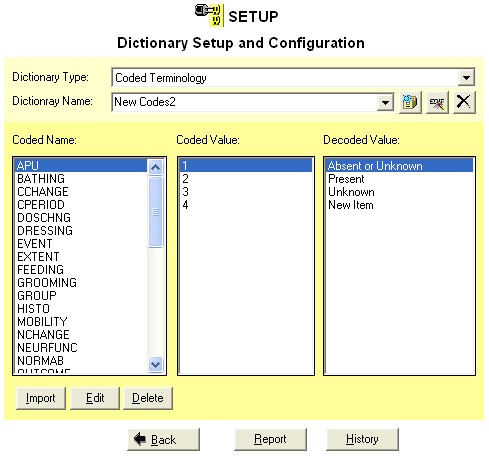
The first step in setting up and
configuring a coded terminology dictionary is to provide a dictionary
name. The name is a unique identifier which is used to distinguish
between different dictionaries that are being managed.
There are three actions that can
be applied to dictionary including the following:
- New Dictionary - This
will create a new empty dictionary with a generic name such as
"New Dictionary 1". The numbers will increment to make
the name unique. It is suggested that the user to rename this to a more
meaningful descriptive name.
- Rename Dictionary - A
dictionary can be renamed to have a different name at any point.
In this case, just type in a new name and click on the rename
button. Numbers and characters can be used but it is recommended
that you avoid using special characters in the dictionary names.
- Delete Dictionary - A
dictionary can be removed or "deleted" from the system
through the delete button. There will be a confirmation
message but to remove the dictionary entirely from
the system.
These three actions can be applied
through the three buttons to the right of the dictionary name entry as shown
here:

Managing
Coded Terminologies
Once coded terminology dictionaries have been created; you can mange
the terms that are stored in the dictionary from the main setup screen. The three tasks that are applied to the terms include:
-
Import - Importing
terms from datasets, format catalogs or other coded dictionaries.
-
Edit - Edit existing
coded terminology. This would change existing values or add or
delete existing values.
- Delete - This would
delete entire sets of coded terminologies.
Setup
Thesaurus Dictionaries
You can setup and manage thesaurus dictionaries through the
SETUP icon from the main screen. From the setup screen, select the
dictionary type of "Thesaurus Dictionary" and you will be
presented with the
following screen.
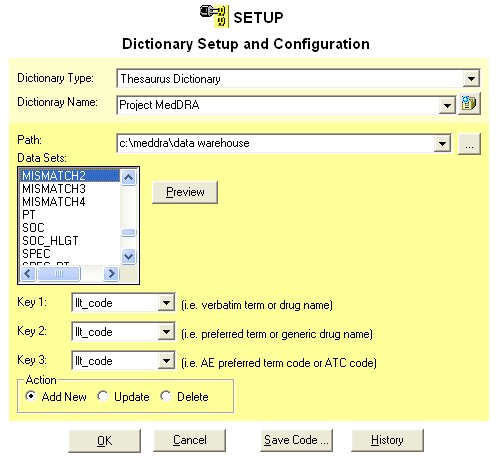
The three main tasks that you can
perform using this screen are available through the radio buttons near the bottom
labeled "Action". These actions include:
Add New
The first step towards adding a new thesaurus dictionary is to enter a
new name. You can either enter a new name by manually typing the name or
clicking on the "new" button to the right of the dictionary
name. In this case, it will default a name such as "New
Dictionary 1" and it would clear all the other fields. After
all the fields are selected, the action entry needs to be set to "Add
New". You can apply this by clicking on the "OK"
button.
Update
You can update the attributes of a dictionary through the
"Update" action section. The first step is to select the
dictionary throsugh the pull down menu of the "Dictionary Name".
Notice that when you change the dictionary, all the attributes will be
refreshed to reflect the selected dictionary. You can then select
and change any of the attributes. Make sure that the
"Update" action attribute is selected and then click on the
"OK" to apply.
Delete
To delete a particular dictionary, select the dictionary through the
pull down menu of the dictionary name, select the "Delete" item
and then click on the OK button. There is a confirmation screen
which upon confirmation, all attributes pertaining to the dictionary will be
removed.
Saving
Setup Macro Code
The same selections that is made in the graphical user interface can
be expressed in macro named %tsetup.
You can select this through the "Save Code..." button. The
sample code that is generated would look like:
libname Thesqa "C:\Program Files\MetaXceed\ThesQA\data";
%tsetup(thesname = Who X Test,
path = c:\thesaurus,
action = Delete,
data = WHODXCYT,
key1 = drugname,
key2 = genname1,
key3 = atc_code);
This same program can then be
executed in batch mode to perform the same dictionary setup.
Reviewing
Setup History
An audit trail of all dictionaries that was setup is kept in the history. This
history can be reviewed and searched through the "History"
button. A history view looks like the following:
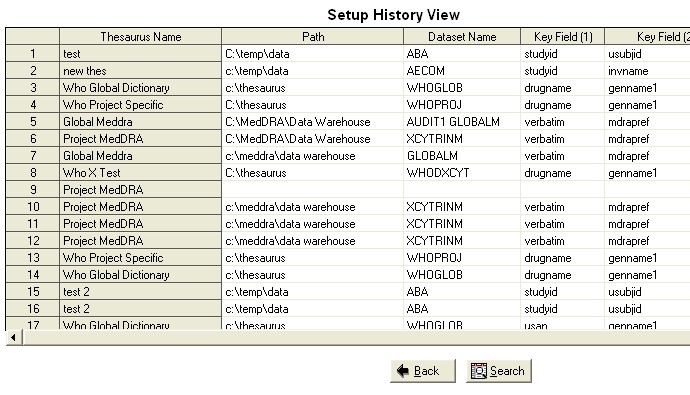
The audit trail captures all data that has been setup including when
and who has applied it. This information can be searched by any
field. The search criteria in which you specified will be applied
to all the fields captured in the audit history.
|


