Outstanding Items (end...)
-
84. Login Menu - On the login screen,
update the menus: Help > Context Help, Usage Manual
Index. Update this for this and other screens.
reviewed by: Sy Truong,
2/20/08
-
85. Invalid User Name - I was testing
user names and password with special characters. After
a while, it currently accepts any name. Please review
the behavior on MXI5.
reviewed by: Sy Truong, 2/20/08
-
86. Tools Menu - On the index screen,
the first three items on the tools menu is not available and
is gray. Please include these three tools on the main
screen.
reviewed by: Sy Truong, 2/20/08
-
81. Save Code Shared Component - The
shared component for save code needs the following
enhancement
-
Window Title - The title of the window needs
to be shown. I see the <title> tag when I
look at the source but some how it has the URL in the
title with path toe the SCL program. I see this in
the CDISC Bulder ADDSEQ example. This seems to be
consistent through other apps since I also see it in
Definedoc. Once updated, please work with the
entire team for update.
-
Standard Status - The resulting status note is
not consistent for other application. This may be
a version issue. On Deinedoc, it has an old
message of:
Result can be view here
Note the missing period and the message is
old. Please verify all tools have latest message.
-
Apply Save Code - Some applications have
macros but do not have the save code option. For
example, reconcile in Syvalidate is a macro but the
reconcile screen does not have the save code. Please update to contain the code generating opiton.
reviewed by: Sy Truong, 1/228/08
Status Text - Please change the result status
from:
Save code was completed
successful.
Results can be viewed here.
to
Save code was completed successfully.
Results can be viewed here.
reviewed by: Sy Truong, 2/12/08
-
79. CDISC Builder Memory - When I tried
ADDSEQ and click OK, when I come back to the screen, the
"Identification Variable" is not from memory as when
I applied the OK. Please do this through our all tools.
reviewed by: Sy Truong, 1/28/08
In my testing, the COMMENT screen does not retain
"Comment Variables". Please verify that every
variable is remembered if processed through the OK.
reviewed by: Sy Truong, 2/1208
-
80. Preview Shared Component - In review of
the shared component for previewing data, I wanted to request
if you can update the following features.
-
Performance - Currently, even though it is
only producing a report for only 100 observatinos, it is
rather slow. I have not looked into the details of
how you produce the HTML of this but I would suggest one
of two ways. Perhaps you can do an experiment and
some benchmark to determine the best.
-
SCL List - The first approach/idea I had
is put evertying into SCL list. Rather than
having stored as temporary datasets, store it into
SCL lists using SCL functions to capture values
directly from the datasets for the 100 obs. Make sure you DELLIST afer you use it but SCL list
can be very effecient.
-
PROC PRINT - Do a PROC PRINT with ODS and
where clause to get an initial HTML and do a post
processing to add the titles/footnotes or other
information needed.
I hope you can invest and have one of these solutions
to make it faster.
-
Multiple Datasets - Currently, the preview
only works for one dataset. There are instances
with multiple dataset selection. Update with an
index for the user to select when multiple datasets are
selected.
reviewed by: Sy Truong, 1/228/08
- 78. Help Menu - The user manual for the web
application will have a specific html file defined slightly
differently from the desktop AF application. For
example, the main index for the user manual for the AF
application is:
usage_manual.html
The index for the web version is:
w_usage_manual.html
It will be the same with the added "w_". This same method will be used to document all the user
manual. So for example, if the AF application has the
specific documentation of:
searching_data.html
The web application will go to: w_searching_data.html
Please do the following to have the help menu links work.
- Help Menu - Make sure that there are these two
menu items and they appear as the first two items in the
help list.
Help > Context Help
Help > Usage Manual Index
- Context Help - Have every page link to a unique
user manual page specific to the screen that the user is
in. If it is a general page, you can link it to
the index. If you think that we are missing and
have not yet documented, please let me know. Use
the w_
name for the link.
Have the link open in a new window that is smaller and
to the side. Have it skinny and taller as a
separate window about 25% of the original window. here is example.
[ Original
Window
] [ Help
Window
]
[
]
[
]
[
]
[
]
[
]
[
]
[
]
[
]
[
]
[
]
[
]
[
]
[
]
[
]
[
]
[
]
[
]
[
]
- Usage Manual Index - In a similar new widow
style to the context help, open a new window for the
usage manual index pointin to: w_usage_manual.html
reviewed by: Sy Truong, 1/23/08
- 12. Apply Logic - Have the tool call the
macro on the server side so for example, when the user clicks
on the OK button on the ADDSEQ screen, it would take all the
selected values and generated the %addseq macro call on the
server then return the result. Have this logic applied for the
following. Let me know which one you have finished as
listed below.
- ADDSEQ
- CDISC CHECKER
- COMMENT
- DIFFTEST
- FINDINGS
- FINDREL
- FMTSUM
- METADATA
- MATCHVAR
- ORDERVAR
- PROC CDISC
- RELREC
- REPORTS
- SD2XPT
- SUPPQUAL
- VARLEN
|
reviewed by: Sy Truong, 12/4/07
-
21. ADDSEQ ERROR - When I try to
run ADDSEQ, I get the error:
72] ERROR: Cannot allocate window.
[73] *** Line 73: [ERROR: #114] Calling function DISPLAY.
Unable to perform requested function
[80] *** Line 19: [ERROR: #114] Calling function DISPLAY.
Unable to perform requested function
This can be if you are trying to use logic for AF which uses
windowe but when running in batch, it has this error. Please make it work in batch.
Also once completed succesfully, have the link to show the
preview of the output of the result similar to the AF app.
Reviewed by: Sy Truong, 12/21/07
On the result of ADDSEQ, the resulting screen has
"Results can be viewed here.",
in this case, the preview has the following title:
| ---
Find Required Sequence Number --- |
| ---
Dataset Name= AE2 --- |
| --
(Subset of first 100 observations) --c |
Can you update this to have the following style:
- Our standardard banner bar which scrolls with along with the
user and the updated text has no "---".
- The data and subset name has the following bolding Tyle:
Dataset Name - AE2
(Subset of first 100 observations)
Also update the footnote to have our standard gray background
banner and make it scroll along with the user.
Reviewed by: Sy Truong, 12/26/07
The report style is not yet updated. Can you please update this to have the following style:
- Our standardard banner bar which scrolls with along with the
user and the updated text has no "---".
- The data and subset name has the following bolding Tyle:
Dataset Name - AE2
(Subset of first 100 observations)
Also update the footnote to have our standard gray background
banner and make it scroll along with the user.
Reviewed by: Sy Truong, 1/8/08
The font size does not seem to be standard. The sub
header needs to be adjusted since it appears too small.
Please udpate the style to be similar to what is noted above.
Reviewed by: Sy Truong, 2/12/08
The headers seems to be fine. The body of the report
however is not standard fonts. Please compare this with
the preview data screen and make it the same. Check both
IE and Firefox.
Reviewed by: Sy Truong, 2/14/08
- 35. Preview Data -
I was working with Tuan Anh on Transdata on the implementation
fo the shared component for preview data. There were
several updates as shown below. Can you therefore review
this functionality in your application and let me know if all
of these are implemented in yours.
Once the data is
available or program has been saved, if the user selects on
the data or program in the hierarchy and select the
"Preview" button, it will use our standard preview
data or preview program screen to show the selected
item.
reviewed by: Sy Truong, 12/27/07
The preview data has a "Close" button rather than
the "Back" button. This is similar to the
preview of programs. Can you update this to be
"Back" button and work with Thanh to ensure that
this is part of the shared module so all preview of data will
have this button.
On the preview data, the window title needs to be
updated. Currently, it just has the application name as
in:
MXI - Transdata(tm)
This is good but we also need to add information about the
data similar to how the preview program is. It should
therefore be:
MXI - Transdata(tm) - Data Preview: MYLIB.MYDATA
Please also work with Thanh or the owner of this shared
component to have this updated on the shared component.
reviewed by: Sy Truong, 1/2/08
This works well for one data selection. Please work on
if user selects mutiple datasets as in CDISC Checker. In
that case, create an index similar to the AF applicaiton.
reviewed by: Sy Truong, 1/2/08
- 41. Test Script - Please help me author the
test script. I have started at:
http://meta-x.com/cdiscbuilder/winstallation_validation.html
http://meta-x.com/cdiscbuilder/v_w_index.html
http://meta-x.com/cdiscbuilder/v_w_addseq.html
http://meta-x.com/cdiscbuilder/v_w_cdisc.html
Please write the detailed instruction based on the items I
have noted.
Upon completion please have Nghi perform the test on MXI5.
reviewed by: Sy Truong, 1/3/08
-
43. Find Sequence - The find sequence tool is usually
used with ADDSEQ. When the user is in this screen,
please make the "Find Sequence" menu from Tools menu
available.
reviewed by: Sy Truong, 1/7/08
-
44. CDISC Checker Status - Similar to the ADDSEQ and
all future tools, the result note should only contain log
evaluation and not all the note messages. If there are
no "cautionary" messages, you do not need to put any
in the note. The icon on the OK button of this
screen is not correct.
In my testing, the link to the results "here." links
to results of ADDSEQ and does not link to the result from
CDISC Checker.
reviewed by: Sy Truong, 1/7/08
It still seem to be not linking to the CDISC
Checking reusults. In my testing, the link to the results "here." links
to results of ADDSEQ and does not link to the result from
CDISC Checker.
reviewed by: Sy Truong, 1/8/08
-
45. Selection Memory - There there are not dataset
selected from the main screen then you check to see if there
is memory for each screen. However, if the user has
selected data on the main index screen, when the user goes to
a specific tool, that selection is then carried over to the
tool to have the same selections.
reviewed by: Sy Truong, 1/9/08
-
47. Configuration - Develop the system configuration to
enter configuration options.
reviewed by: Sy Truong, 1/9/08
-
49. Upload Data - Allows user to Transfer a SAS dataset
upto a specified library. This will require more
specifications to handle compessed zip file. This spec
is being developed.
reviewed by: Sy Truong, 1/9/08
-
51. DIFFTEST - Develop the screen which "Verify
Differences among SAS Datasets".
reviewed by: Sy Truong, 1/9/08
-
52. FINDINGS - Develop the screen which "Generate
CDISC Findings Dataset".
reviewed by: Sy Truong, 1/9/08
-
53. FINDREL - Develop the screen which "Find
Variables that are Potential Related Records".
reviewed by: Sy Truong, 1/9/08
-
54. FMTSUM - Develop the screen which "Create a
Summary Report of All Formats".
reviewed by: Sy Truong, 1/9/08
The layout looks nice. Please continue on the logic of
the screen including defaults, memory and buton function.
reviewed by: Sy Truong, 1/11/08
-
55. METADATA - Develop the screen which "Create
and Manage Metadata Database".
reviewed by: Sy Truong, 1/9/08
-
56. MATCHVAR - Develop the screen which "Match
Variable Names and Labels if They are Similar".
reviewed by: Sy Truong, 1/9/08
The layout looks nice. Please continue on the logic of
the screen including defaults, memory and buton function.
reviewed by: Sy Truong, 1/11/08
-
57. ORDERVAR - Develop the screen which "Modifiers
the Position Order of the Variables".
reviewed by: Sy Truong, 1/9/08
-
58. PROC CDISC - Develop the screen which "Import
and Export XML with CDISC Models".
reviewed by: Sy Truong, 1/9/08
-
59. RELREC - Develop the screen which "Generate
CDISC Relating Groups of Records".
reviewed by: Sy Truong, 1/9/08
-
60. REPORTS - Develop the screen which "Generate
Reports".
reviewed by: Sy Truong, 1/9/08
-
61. SD2XPT - Develop the screen which "Create a
SAS Transport File from SAS Datasets".
reviewed by: Sy Truong, 1/9/08
For consistency, have the (i.e. myfile.xpt or *) text appear
under the entry rather than to the right of it.
The layout looks nice. Please continue on the logic of
the screen including defaults, memory and buton function.
reviewed by: Sy Truong, 1/11/08
-
62. SUPPQUAL - Develop the screen which "Generate
CDISC Supplemental Qualifiers".
reviewed by: Sy Truong, 1/9/08
-
63. VARLEN - Develop the screen which "Evaluate
the Variables and Recommend Lengths".
reviewed by: Sy Truong, 1/9/08
-
64. FIND SEQUENCE - Develop the screen similar to the
AF screen.
reviewed by: Sy Truong, 1/9/08
-
65. FIND COMMENT - Develop the screen similar to the AF
screen.
reviewed by: Sy Truong, 1/9/08
-
66. FIND Related - Develop the screen similar to the AF
screen.
reviewed by: Sy Truong, 1/9/08
-
67. FIND Related - Develop the screen similar to the AF
screen.
reviewed by: Sy Truong, 1/9/08
-
68. Meta Data Search - Develop the screen similar to
the AF screen.
reviewed by: Sy Truong, 1/9/08
-
69. Audit Trail Report - Develop the screen similar to
the AF screen.
reviewed by: Sy Truong, 1/9/08
-
70. Variable Length Report - Develop the screen similar
to the AF screen.
reviewed by: Sy Truong, 1/9/08
-
71. Program and Data Dependency - Develop the screen
similar to the AF screen.
reviewed by: Sy Truong, 1/9/08
-
72. Tracibility Report - Develop the screen similar to
the AF screen.
reviewed by: Sy Truong, 1/9/08
-
73. View Code - Develop the screen similar to the AF
screen.
reviewed by: Sy Truong, 1/9/08
-
74. PROC CDISC Update - I have received an update from
SAS for an new release of PROC CDISC. Please do the
following to have it work for our software.
- Download - Download the latest version at: http://www.sas.com/apps/demosdownloads/proccdisc_PROD_9_sysdep.jsp?packageID=000369
I am currently asking SAS on the version for SAS
8.2. In the mean time, have these installed on all
team members machines along with MXI5 to include the
latest version for SAS 9.
- Test - Test out the tool both in interactive GUI
and batch to see if it works.
- New Features - Review the documentation from the
download site to see if there are any new parameters or
options. If so, please make a list of these. I
will review to determine if we would include them.
- Documentation - Review all the files that
reference PROC CDISC to see if we need to update them with
either updated download or new features. Please
review the following:
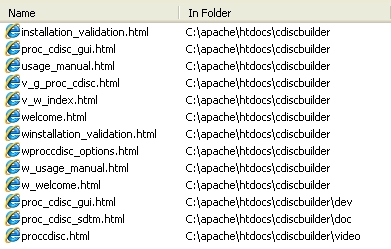
- Installer - Update the AF installer so that if it
does not find the DLLs in the SASROOT/CDISC, it will
install it and update the configuration file to include
it.
reviewed by: Sy Truong, 1/16/08
Completed Items
- 1. Tool Tip Menu - The orange pull down menu needs
to be updated so that it does not have the fly over tool tip
menu. This is the alternative text. Have this
removed.
reviewed by: Sy Truong, 11/14/07
- 2. Center Index - The main index page is left
justified. This may be due to the updated header. Please update so it is centered.
reviewed by: Sy Truong, 11/14/07
- 9. Title Caps - On titles such as banner
of user login screen, the word "CDISC" has lower
case as: "Cdisc". Please update this to be all
upper case. Do a "t_search" and make sure all
titles to "CDISC" is all caps.
reviewed by: Sy Truong, 12/3/07
- 5. Preview Enhancement -
a) Remove the
DEBUG 131 since I get all the debugging statement when I click
on the Preview.
b) In my case, the new popup for preview has the URL as part
of the window. See if you can have the popup window just
show the HTML without the URL at the top.
reviewed by: Sy Truong, 11/22/07
- 7. Preview Footnote - The footer right
now just has "Meta-Xceed Inc. © 2007". See if you can add the date time and user name along with file
location similar to our desktop AF application.
reviewed by: Sy Truong, 11/25/07
- 10. Library Selection - When user selects
a library through the [...] library manager, it will bring it
back to the screen the list the new set fo dataset. I
tried this on ADDSEQ and it does not work. Ask Tuan Anh
since he has this working well in Trransdata.
reviewed by: Sy Truong, 12/3/07
-
13. CDISC Email - I am writting a new CDISC
blog (http://meta-x.com/cdisc/)
based upon the user group meeting on CDISC related work.
I am planning to send this out including members that attended
this meeting. They signed in through paper but I need to
send this via email. I therefore wanted to ask if you
can help me with this email.
- Email List - I am attaching two hand
written list of email addresses. We need to
create a list which only contains the first name
along with the email address. This will later
be edited into the BAT file which I am also
attaching for your review. You can look at the
first two as examples where "Sy" is the
first name and therefore you can skip the last
"Truong" name.
- Update BAT - Update the BAT file name at
the bottom. I want you to search through the
current BAT file and if there is the same email
address, please remove from the above list so that
the user only appears once.
- Deliverables - Send me an excel spreadsheet
with the list entered from the hand written list and
also an updated BAT file.
|
reviewed by: Sy Truong, 12/10/07
19. Login Error - On the latest version, after
I log in from the main screen, I get the error below. I
am therefore not able to test the rest of the updates.
NOTE: running request
program cdisclib.wcdiscbuilder.wmain.scl ERROR:
Label WriteJavaScript does not exist in
CDISCLIB.SHARECOM.WLIB_MANAGER_METHODS.SCL. *** Line 53:
[ERROR: #114] Calling function METHOD. Unable to perform
requested function Arguments passed to METHOD: 1
(Character Expression $T1)=cdisclib.sharecom.Wlib_manager_methods.scl
2 (Character Literal) = 'WriteJavaScript' Parameters
passed to METHOD ENTRY: Program returning prematurely at
line 53 AF Program: CDISCLIB.WCDISCBUILDER._HEADER.SCL
Traceback: CDISCLIB.WCDISCBUILDER._HEADER.SCL: Line 53
CDISCLIB.WCDISCBUILDER.WMAIN.SCL: Line 51
SASHELP.WEBAPS.RUNSCL.SCL: Line 45 NOTE:
request has completed
WARNING: Application generated no output. |
Reviewed by: Sy Truong, 12/17/07
17. Identification Variable - When the user
selects on a dataset with variables such as in ADDSEQ, there
is logic that would default the identification variable field
to things like AESEQ. You can use the same algorithm as
in the AF application but may need to modify a little to
function with Java Script. Apply this same logic to all
modules with this field.
reviewed by: Sy Truong, 12/13/07
3. Preview JS - In the shared component
instructions documented at: http://meta-x.com/projects/preview.html,
you have the javascript sharecom.js located at:
src="&appwebroot/sharecom.js"
However, not all applications have &appwebroot defined.
Please detail how you defined this in the configuration.
reviewed by: Sy Truong, 11/17/07
- 4. Preview SCL - In the SCL program as
documented at: http://meta-x.com/projects/preview.html,
there are several suggestions.
a) The indentation of the code starting with the HTML is
not consistent and has a large indentation.
b) There are many references to CDISC Builder hard
coded. Text in the titles, libname, catalog names,
etc... Note all the CDISC builder specific items and have user
update to reflect thei own application.
c) There is reference to &LIBRARY and &DATA. Please document how the user must define this in order for it
to work.
reviewed by: Sy Truong, 11/17/07
- 11. Default Pull Down - On pull down
menus such as Identification Variable or Unique Subject ID
variables, or Related Domain, see if you can program it to
default by the same criteria that we used on AF application.
Note that for the "Related Domain" you may need to
generate Java Script.
reviewed by: Sy Truong, 12/4/07
15. Status Popup - Upon completion of
the save code, it will have a pop up rather than the standard
HTML.
reviewed by: Sy Truong, 12/11/07
14. Save Code Path - When I click on
the [...] button and select a path, it does not get assigned
back to the save code screen.
reviewed by: Sy Truong, 12/11/07
When I leave the path as "root/" and then I
click on the OK button in the Save Code screen, it gives me
the error:
Path must point to folder in root.
I also tried just "root" and it has the same
problem.
We also need to add an (i.e. myprog) at the bottom similar to
the AF application. This way, the user does not type in
the extension.
reviewed by: Sy Truong, 12/18/07
The path issue still does not work for me. In the
diary blog, please paste the entire message of the request
rather than just the title.
reviewed by: Sy Truong, 12/19/07
-
19. index.html - On mxi5, please udpate the login
page to be index.html rather than windex.html
reviewed by: Sy Truong, 12/19/07
-
20. Save Code ERROR - When I click on the OK
button on the Save Code screen, I get the error:
<HTML><TITLE>Error reading SAS
output</TITLE>
Can you update so that it is a nice message rather than
this pop up.
Reviewed by: Sy Truong, 12/19/07
-
6. Preview Programs - See if you can create a
preview for programs. It can look similar in terms of
the title banner that moves with the scroll. There is
not label as in a dataset label but you can have the program
name and location. Have the program be displayed in
<pre> so that it retains indentation.
reviewed by: Sy Truong, 11/22/07
Continue to work on the user name for the footnote.
reviewed by: Sy Truong, 12/18/07
Update the title of the window to also contain the name of the
program. It now says MXI - CDISC Builder(tm). Can
you update it to say:
MXI - CDISC Builder(tm) - Program Preview: root/mypath/myfile.sas
reviewed by: Sy Truong, 12/21/07
- 8. Login Default - On the login screen,
have the default prompt be on the user name. So the user
does not have to click on the user name and can just start
entering their name upon entry.
reviewed by: Sy Truong, 12/3/07
Update the pull down menu as well so if the user selects
"Log Out", it would link to meta-x.com. If the
user selects "Log In", it would link to the login
page of CDISC Bulder.
reviewed by: Sy Truong, 12/18/07
The login screen seems to have the icon compressed. Can
you verify that the icon is correctly sized.
reviewed by: Sy Truong, 12/21/07
-
18. Library Manager Default - This does not
happen all the time but some times when I click on the [...]
button and it goes to the library manager screen, the default
library is selected but the library manager entry and path
below are empty. We should update so that it also
display the selected liname.
reviewed by: Sy Truong, 12/13/07
-
20. Save Code Parameters - In my testing on
the ADDSEQ, I specified the Unique Subject ID (I left default)
and also ID Variable as default but when I save the code,
these parameter are blank as in:
%addseq(data=,
rdomain=AE - Adverse Events,
usubjid=,
idvar=,
basecode=root/temp.sas);
Reviewed by: Sy Truong, 12/21/07
23. Double Slash - When i select
a file through the [...] button on ADDSEQ, it returns a path
with two slashes as in:
root//147421369123.sas
Please update this so that it will have one slash.
Reviewed by: Sy Truong, 12/24/07
-
27. Resulting Status - On
the resulting status dialog box after ADDSEQ, In the case
where there is an error, the icon is correct and shows the red
X but the message still has "NOTE". Please
change from:
Note - Verification was completed with error(s).
to
ERROR - Verification was completed with error(s).
Reviewed by: Sy Truong, 12/27/07
-
22. Default Start - Currently after the
login, it goes to ADDSEQ. Please have the user go to the
index page which has all the tools listed so the user can link
to any specific tool.
Reviewed by: Sy Truong, 12/24/07
-
23. Cancel Button - Currently, the
cancel button on the ADDSEQ does not do anything. Update
so that all Cancel buttons goes back to the main index page
where it lists all the tools.
Reviewed by: Sy Truong, 12/26/07
-
24. Footnote Banner - On the index
screen, the banner does not have the banner. Please
update all banner to have gray background.
Reviewed by: Sy Truong, 12/26/07
-
25. Select File
-The File
Selection screen has squared corners rather than our
rounded. The "File Name" is not bolded. Please update with latest shared components.
Reviewed by: Sy Truong, 12/26/07
-
28. Exit Menu - I am trying to standardize
the menu against other programs. Can you therefore
remove "Log out" from the file menu and add a
"Exit" item as the last item in the File menu.
In this case, when the user clicks on the exit button, please
navigate to the login screen.
reviewed by: Sy Truong, 12/27/07
The exit now goes to our http://meta-x.com/.
Please update this so it goes back to the CDISC Builder login
page.
reviewed by: Sy Truong, 12/28/07
The exit menu seem to work but the menu has not been
updated on all screens. For example, the CDISC index
screen that lists all the tools does not have this
"Exit" item. Please review all screens and
update this menu..
Reviewed by: Sy Truong, 12/29/07
-
30. CDISC Checker - Please update the cancel
button on CDISC checker and all tools so it goes back to the
index page with all the tools shown.
reviewed by: Sy Truong, 12/28/07
-
34. Coming Soon - I
was working with Nghi on this for Definedoc. However, it
may affect shared components on your app. Can you please
review the following and check with Nghi if this is resolved
on your application as well.
On many of the menu items that are
not done, it just crashes now. Rather than leaving it as
a crashed screen, please add a simple prompt saying:
Coming Soon.
[OK]
requested by: Sy Truong, 1/2/08
29. Save Code Memory - In the save code, it
seems like the default value for the file name is
working. However, if I were to save one for ADDSEQ and
then go to CDISC checker then go back to ADDSEQ, the path is
not retained. See if you can create memory for each tool
for the path that is last implementeed.
reviewed by: Sy Truong, 12/28/07
The path is not working for save code screen.
reviewed by: Sy Truong, 1/3/08
- 37. Refresh Icon - Work with Nhi on the
latest since there are updates. In my case of the
"File Selection" screen, the refresh button is
missing the icon.
reviewed by: Sy Truong, 1/3/08
- 16. Save Code Path - In the actual
code generated in the base code, rather than using the
"root" as in:
basecode=root/temp.sas
Update so that it has the full path.
reviewed by: Sy Truong, 12/11/07
When I click on the [...] now in Save Code screen, it
closes down the popup window.
reviewed by: Sy Truong, 1/3/08
After the completion of the save
code, the current message is:
Save code was completed
successful.
Result can be view here
Please update it to:
Save code was completed
successful.
Results can be viewed here.
Note that there is a period after the "here".
reviewed by: Sy Truong, 1/5/08
- 31. About Popup - Please create an about
dialog box pop-up that is standardized from Tuan Anh's
"About Transdata". The differences is that you
will be updating all text that says "Transdata" to
say your application. You also need to use your logo
which is located at:
http://meta-x.com/demo_request.html
You can also find the little MetaXceed logo at: http://meta-x.com/logo_small.jpg
Have this as the last menu item in the "Help"
pull down menu similar to Transdata.
reviewed by: Sy Truong, 1/2/07
Have the version be 3.0. Update the OK button icon
to have standard size.
reviewed by: Sy Truong, 1/5/07
- 36. Base Code Warning - When I click on the
"Save Code" button on the ADDSEQ screen, it prompts
the message:
WARNING - Base code path must start with
"root/" and must be a ".sas" file
In this case, I do not have any thing specified for base
code. Please only prompt this if there is a value for
base code.
reviewed by: Sy Truong, 1/3/08
Update the check since it seems to be missing for path such
as:
testroot/147421369123.sas
In this case, it accetps.
reviewed by: Sy Truong, 1/5/08
-
26. Button Icons - Check
with Tuan Anh and Nghi on buttons since I see the "Select
All" and "Preview" buttons have icons on
Definedoc but not on our CDISC Builder.
Reviewed by: Sy Truong, 12/26/07
Please check MXI5 since the icon for select all is not
shown.
Reviewed by: Sy Truong, 12/27/07
The select all button icon is not the right size since the
graphics is pixilated. Please verify this. The
CDISC button does not have an icon since you are using the
preview icon. Please remove this preview icon for the
CDISC button.
Reviewed by: Sy Truong, 12/28/07
It used to be that the template screen for all the other
tools were avaiable. But now when I try one of the other
tools outside the ADDSEQ or CDISC, I get the following ERROR:
The program cdisclib.wcdiscbuilder.wcomment.scl is not
available:
ERROR: Entry WCOMMENT.SCL not found in catalog
CDISCLIB.WCDISCBUILDER.
Please udpate so that it will show the screens even though
it may not be display but will be have all the standard
buttons including the Select All.
Reviewed by: Sy Truong, 12/29/07
The button icons seem to be compressed. Please
compare Cancel icon and also Save Code icon on the button with
the ones found at:
http://meta-x.com/projects/buttons/index.html
Please update your buttons to be the same as standard
buttons.
Reviewed by: Sy Truong, 1/3/08
The OK button on status popup still seem to be
compressed. Please check all buttons.
Reviewed by: Sy Truong, 1/5/08
I still see compressed icon on the OK button as shown on the
error message:
ERROR - Verification was completed with error(s).
Please review all buttons and make sure the icon size is
correct.
Reviewed by: Sy Truong, 1/7/08
-
32. Folder Refresh - I was
working with Nghi on this for Definedoc. However, it may
affect shared components on your app. Can you please
review the following and check with Nghi if this is resolved
on your application as well.
Work with Nhi on this but if
I were to have a new folder created, it does not refresh.
Have a new refresh button added to the right of the two list
on the "Folder Selection" screen. In this
case, when the user click refresh, it updates all items.
requested by: Sy Truong, 1/2/08
Get an updated version since in your version, the root
path is not at the top as what I see on Nhi. Also get
the icon for the refresh button. Nhi is currently
working on updates to the refresh to retain selection so
please get an update once she is finished.
requested by: Sy Truong, 1/3/08
The root icon on the left panel seems to be lower. Please adjust the location so that it is of the right vertical
position.
requested by: Sy Truong, 1/5/08
The root icon on the left panel is still to be lower.
Please adjust the location so that it is of the right vertical
position.
requested by: Sy Truong, 1/7/08
46. Order Index - On the main screen, can you change
the position of the REPORTS icon so that it will be
alphebetical. Currently, it shows up after the
"COMMENT". The MATCHVAR should go before
METADATA. Make sure the menu also reflect the
alphabetize order.
reviewed by: Sy Truong, 1/9/08
-
48. Library - From the menu: File > Library, open
the library managment which allows you to manage your data
librairies.
reviewed by: Sy Truong, 1/9/08
This seem to work for the main screen but under the tools it
is not. Please apply this menu to work on all screens.
reviewed by: Sy Truong, 1/10/08
74. Message Update - The following messages needs
to be updated because of either style of english
wording. Note that I am not sure if some of these are
part of a PUT statement or an HTML. If can
review and find that it is a PUT statement in the log then
you can ignore the HTML markup tags I have added. If
it is a popup, please include HTML tags. I will list
the before and after correction.
Please use cut and paste since some of the changes are very
small and you may miss by retyping
result_status.scl: (index(lowcase(line),"has 0 obs") > 0 and index(lowcase(line),"note: the data set work.result has 0 observations") < 0) or
result_status.scl: (index(lowcase(line),"has 0 obs") > 0 and index(lowcase(line),"<b>NOTE</b> - the data set work.result has 0 observations") < 0) or
result_status.scl: (index(lowcase(line),"same physical library") > 0 and index(lowcase(line),"note: Libname templib refers to the same physical library as") < 0 ) or
result_status.scl: (index(lowcase(line),"same physical library") > 0 and index(lowcase(line),"<b>NOTE</b> - Libname templib refers to the same physical library as") < 0 ) or
verify.scl: call symput('_message','NOTE - An valid password was verfied for user:' || username || '.');
verify.scl: call symput('_message','<b>NOTE</b> - An valid password was verified for user:' || username || '.');
verify.scl: call symput('_message','NOTE - A valid session ID was identified for user:' || username || '.');
verify.scl: call symput('_message','<b>NOTE</b> - A valid session ID was identified for user:' || username || '.');
verify.scl: call symput('_message','NOTE: The user name:' || username || ' was created successfully.');
verify.scl: call symput('_message','<b>NOTE</b> - The user name:' || username || ' was created successfully.');
waddseq_methods.scl: ClassInfoDialog.showInfoDialog("WARNING",'Base code must be a ".sas" file.');
waddseq_methods.scl: ClassInfoDialog.showInfoDialog("WARNING",'<b>WARNING</b> - Base code must be a ".sas" file.');
waddseq_methods.scl: ClassInfoDialog.showInfoDialog("WARNING",'Base code path must start with "root/" and must be a ".sas" file.');
waddseq_methods.scl: ClassInfoDialog.showInfoDialog("WARNING",'<b>WARNING</b> - Base code path must start with "root/" and must be a ".sas" file.');
waddseq_methods.scl: ClassInfoDialog.showInfoDialog("WARNING",'Base code path must start with "root/" and must be a ".sas" file.');
waddseq_methods.scl: ClassInfoDialog.showInfoDialog("WARNING",'<b>WARNING</b> - Base code path must start with "root/" and must be a ".sas" file.');
waddseq_methods.scl: ClassInfoDialog.showInfoDialog("WARNING","WARNING","Please select a dataset.");
waddseq_methods.scl: ClassInfoDialog.showInfoDialog("WARNING","<b>WARNING</b> - ","Please select a dataset.");
waddseq_methods.scl: ClassInfoDialog.showInfoDialog("WARNING",'Library name could no be blank. Please re-assign it.');
waddseq_methods.scl: ClassInfoDialog.showInfoDialog("WARNING",'<b>WARNING</b> - Library name could no be blank. Please re-assign it.');
waddseq_methods.scl: ClassInfoDialog.showInfoDialog("WARNING",'Please select a dataset.');
waddseq_methods.scl: ClassInfoDialog.showInfoDialog("WARNING",'<b>WARNING</b> - Please select a dataset.');
waddseq_methods.scl: ClassInfoDialog.showInfoDialog("WARNING",'Please select a library.');
waddseq_methods.scl: ClassInfoDialog.showInfoDialog("WARNING",'<b>WARNING</b> - Please select a library.');
waddseq_methods.scl: ClassInfoDialog.showInfoDialog("WARNING",'Please select a valid library.');
waddseq_methods.scl: ClassInfoDialog.showInfoDialog("WARNING",'<b>WARNING</b> - Please select a valid library.');
waddseq_methods.scl: ClassInfoDialog.showInfoDialog("WARNING",'Please select an Identification Variable.');
waddseq_methods.scl: ClassInfoDialog.showInfoDialog("WARNING",'<b>WARNING</b> - Please select an Identification Variable.');
waddseq_methods.scl: ClassInfoDialog.showInfoDialog("WARNING",'Please select an Unique Subject ID Variable.');
waddseq_methods.scl: ClassInfoDialog.showInfoDialog("WARNING",'<b>WARNING</b> - Please select an Unique Subject ID Variable.');
waddseq_methods.scl: ClassInfoDialog.showInfoDialog("WARNING",'The selected dataset name is blank.');
waddseq_methods.scl: ClassInfoDialog.showInfoDialog("WARNING",'<b>WARNING</b> - The selected dataset name is blank.');
waddseq_methods.scl: ClassInfoDialog.showInfoDialog("WARNING",'There is not any dataset in the selected library.');
waddseq_methods.scl: ClassInfoDialog.showInfoDialog("WARNING",'<b>WARNING</b> - There are no datasets found in the selected library.');
waddseq_methods.scl: ClassInfoDialog.showInfoDialog("WARNING",'There is not library assigned.');
waddseq_methods.scl: ClassInfoDialog.showInfoDialog("WARNING",'<b>WARNING</b> - There are no datasets found in the library assigned.');
wcdisc3.scl: <b>WARNING</b> - Verification was completed with warning(s).<br>
wcdisc3.scl: <b>WARNING</b> - Verification was completed with warning(s).<br>
wcdisc_methods.scl: popupDlg(null, '', '<b>WARNING</b> - Library name could no be blank. Please re-assign it.', '', '', 'WARNING', '');
wcdisc_methods.scl: popupDlg(null, '', '<b>WARNING</b> - Library name can not be blank. Please re-assign it.', '', '', 'WARNING', '');
wcdisc_methods.scl: popupDlg(null, '', '<b>WARNING</b> - The selected dataset name is blank.', '', '', 'WARNING', '');
wcdisc_methods.scl: popupDlg(null, '', '<b>WARNING</b> - The selected dataset name is blank.', '', '', 'WARNING', '');
wcdisc_methods.scl: popupDlg(null, '', '<b>WARNING</b> - There is not any dataset in the selected library.', '', '', 'WARNING', '');
wcdisc_methods.scl: popupDlg(null, '', '<b>WARNING</b> - There are no datasets in the selected library.', '', '', 'WARNING', '');
wcdisc_methods.scl: popupDlg(null, '', '<b>WARNING</b> - There is not library assigned.', '', '', 'WARNING', '');
wcdisc_methods.scl: popupDlg(null, '', '<b>WARNING</b> - There are no datasets in library assigned.', '', '', 'WARNING', '');
wcomment_methods.scl: popupDlg(null, '', '<b>WARNING</b> - Library name could no be blank. Please re-assign it.', '', '', 'WARNING', '');
wcomment_methods.scl: popupDlg(null, '', '<b>WARNING</b> - Library names can not be blank. Please re-assign it.', '', '', 'WARNING', '');
wcomment_methods.scl: popupDlg(null, '', '<b>WARNING</b> - There is not any dataset in the selected library.', '', '', 'WARNING', '');
wcomment_methods.scl: popupDlg(null, '', '<b>WARNING</b> - There are no datasets in the selected library.', '', '', 'WARNING', '');
wcomment_methods.scl: popupDlg(null, '', '<b>WARNING</b> - There is not library assigned.', '', '', 'WARNING', '');
wcomment_methods.scl: popupDlg(null, '', '<b>WARNING</b> - There are no libraries assigned.', '', '', 'WARNING', '');
wlogin.scl: ClassInfoDialog.showInfoDialog("WARNING", "Password is missing.");
wlogin.scl: ClassInfoDialog.showInfoDialog("<b>WARNING</b> - ", "Password is missing.");
wlogin.scl: ClassInfoDialog.showInfoDialog("WARNING", "User Name is missing.");
wlogin.scl: ClassInfoDialog.showInfoDialog("<b>WARNING</b> - ", "User Name is missing.");
wmain_methods.scl: ClassInfoDialog.showInfoDialog("WARNING", "Library name could no be blank. Please re-assign it.");
wmain_methods.scl: ClassInfoDialog.showInfoDialog("<b>WARNING</b> - ", "Library name could no be blank. Please re-assign it.");
wmain_methods.scl: ClassInfoDialog.showInfoDialog("WARNING", "Please select a dataset.");
wmain_methods.scl: ClassInfoDialog.showInfoDialog("<b>WARNING</b> - ", "Please select a dataset.");
wmain_methods.scl: ClassInfoDialog.showInfoDialog("WARNING", "Please select a library.");
wmain_methods.scl: ClassInfoDialog.showInfoDialog("<b>WARNING</b> - ", "Please select a library.");
wmain_methods.scl: ClassInfoDialog.showInfoDialog("WARNING", "The selected dataset name is blank.");
wmain_methods.scl: ClassInfoDialog.showInfoDialog("<b>WARNING</b> - ", "The selected dataset name is blank.");
wmain_methods.scl: ClassInfoDialog.showInfoDialog("WARNING", "There is not any dataset in the selected library.");
wmain_methods.scl: ClassInfoDialog.showInfoDialog("<b>WARNING</b> - ", "There are no datasets in the selected library.");
wmain_methods.scl: ClassInfoDialog.showInfoDialog("WARNING", "There is not library assigned.");
wmain_methods.scl: ClassInfoDialog.showInfoDialog("<b>WARNING</b> - ", "There are no libraries assigned.");
result_status.scl: mess = "ERROR: The log file " || logfile || " does not exist.";
result_status.scl: mess = "<b>ERROR</b> - The log file " || logfile || " does not exist.";
verify.scl: call symput('_message','ERROR - An invalid session ID was identified for user:' || username || '.');
verify.scl: call symput('_message','<b>ERROR</b> - An invalid session ID was identified for user:' || username || '.');
verify.scl: message='ERROR - An invalid password was entered for user:' || username || '.';
verify.scl: message='<b>ERROR</b> - An invalid password was entered for user:' || username || '.';
verify.scl: message='ERROR - An invalid session ID was identified for user:' || username || '.';
verify.scl: message='<b>ERROR</b> - An invalid session ID was found for user:' || username || '.';
verify.scl: message='ERROR - The session time has expired beyond 10 minutes.';
verify.scl: message='<b>ERROR</b> - The session time has expired beyond 10 minutes.';
reviewed by: Sy Truong, 1/16/08
Update all dialog popup so it will have default focus on the
OK button. That way, when the user hits the enter
keyboard, it will apply the OK button.
reviewed by: Sy Truong, 1/17/08
75. Result Status - On the result status, we
currently have a message and the a list that looks like a
log evaluation. Add a logic so that in the case where
there are no "cautionary" text in the log and the
list is empty, do not show the empty list. Just have
the note and then the OK button. Make the OK
button the default focus as well so the user can just hit
enter and it will close the dialog box.
reviewed by: Sy Truong, 1/17/08
When I try to apply the CDISC Checker not to verify this, I
get the following error.
This request completed with errors.
Set _DEBUG=131 and resubmit in order to see the SAS Log
file, or set _DEBUG=16 to see a hex dump of the output.
reviewed by: Sy Truong, 1/21/08
The status window looks good. The text that is
displayed in the resulting status doesn't seem to correspond
to the task. For example, in the ADDSEQ test, I
received a status text:
WARNING - Verification was completed with warning(s).
Results can be viewed here.
Please update this to match ADDSEQ as in:
WARNING - Add sequence number was completed with
warning(s).
Results can be viewed here.
Update all messages with the text that appears similar to
the subtitle of the screen that is currently being applied.
reviewed by: Sy Truong, 1/22/08
- 77. Resulting Font - When I tried ADDSEQ and upon
completion, I click on the "here" link and it
brings up a report. The report seem to have a large
font. Can you verify this against the Preview report
since they should have the same font size.
reviewed by: Sy Truong, 1/21/08
-
50. COMMENT - Develop the screen which "Generate
Comment Domain Dataset".
reviewed by: Sy Truong, 1/9/08
- Update the preview button for output to have icon.
- Continue on the logic since none of the buttons and
fields work yet.
reviewed by: Sy Truong, 1/11/08
Review the default logic on the AF application for he comment
variables, date varaible, identification variables, subject ID
varialbles. Update this to be javascript logic so if the
user selects on a dataset with a list of variables, it would
default the correct one with the same defaults as the AF
application.
reviewed by: Sy Truong, 1/29/08
-
33. Example Text - I
was working with Nghi on this for Definedoc. However, it
may affect shared components on your app. Can you please
review the following and check with Nghi if this is resolved
on your application as well.
We need the (i.e. sample)
text for several entry. For example, on the main screen,
under the text entry, we need the sample (i.e. ...) similar to
the AF application. The two fields on the main screen
is:
Output File
Annotated CRF Template
Please also review other screens and have the sample (i.e....
) text placed under the entries similar to AF application.
requested by: Sy Truong, 12/26/07
The three dots (...) was only meant as an example. Please remove the three dots and just have the example text
similar to how the AF application is.
requested by: Sy Truong, 12/28/07
Update the font size of the i.e. text to be similar to the
"(i.e. ../xptfiles)"
in the General Information screen rather the small version on
the main screen. You can make the entry a little wider
if the example is too long.
requested by: Sy Truong, 1/2/08
This looks good. Can you please create the template
screen for all the other tools with sample text with correct
size. You don't have to have all fucntionality
yet. You can put "Coming soon...." but please
create the screen.
requested by: Sy Truong, 1/7/08
- 38. Path Memory Carry Over - If a
particular path is selected on one tool such as ADDSEQ and
then it is applied, then when the user goes back to the main
screen or any other screen, that path is remembered and
carried over. This is similar to the AF applicaiton.
reviewed by: Sy Truong, 1/3/08
-
39. ADDSEQ Error - When I click on the OK
button now on the ADDSEQ, I get the error:
This request completed with errors.
Set _DEBUG=131 and resubmit in order to see the SAS Log file,
or set _DEBUG=16 to see a hex dump of the output.
reviewed by: Sy Truong, 1/3/08
When I try, I get errors in the log such as:
[220] ERROR: There is a statistic but no ANALYSIS usage associated
Can you verify why this is and try to resolve.
reviewed by: Sy Truong, 1/5/08
There seem to be extra message in the status results. In
the case after it finishes, do a "logeval" for
cautionary messages only. It appears that the popup now
shows all the log notes. I get the following list which
seem to contain items that are not "cautionary".
[1] NOTE: PROCEDURE PRINTTO used:
[13] NOTE: Library DATALIB does not exist.
[23] NOTE: DATA statement used:
[29] NOTE: %INCLUDE (level 1) file C:\Program Files\MetaXceed\Cdiscbuilder\saspgm\addseq.sas is file C:\Program Files\MetaXceed\Cdiscbuilder\saspgm\addseq.sas.
[40] NOTE: Libref CDISCBLD was successfully assigned as follows:
[54] NOTE: %INCLUDE (level 1) ending.
[66] NOTE: [addseq] It will be updated.
[78] NOTE: There were 829 observations read from the data set DATA.DM.
[79] NOTE: The data set DATA.DM has 829 observations and 36 variables.
[80] NOTE: DATA statement used:
[92] NOTE: There were 829 observations read from the data set DATA.DM.
[93] NOTE: The data set DATA.DM has 829 observations and 36 variables.
[94] NOTE: PROCEDURE SORT used:
[104] NOTE: There were 829 observations read from the data set DATA.DM.
[105] NOTE: The data set DATA.DM has 829 observations and 35 variables.
[106] NOTE: DATA statement used:
[128] NOTE: There were 829 observations read from the data set DATA.DM.
[129] NOTE: The data set DATA.DM has 829 observations and 36 variables.
[130] NOTE: DATA statement used:
[143] NOTE: There were 829 observations read from the data set DATA.DM.
[144] NOTE: The data set DATA.DM has 829 observations and 36 variables.
[145] NOTE: PROCEDURE SORT used:
[156] NOTE: There were 829 observations read from the data set DATA.DM.
[157] NOTE: The data set DATA.DM has 829 observations and 35 variables.
[158] NOTE: DATA statement used:
[169] NOTE: There were 100 observations read from the data set DATA.DM.
[170] NOTE: The data set WORK.REPORT has 100 observations and 35 variables.
[171] NOTE: DATA statement used:
[178] NOTE: Writing HTML Body file: C:\Program Files\Apache Group\Apache2\htdocs\Cdiscbuilder/testout.html
[192] NOTE: There were 100 observations read from the data set WORK.REPORT.
[193] NOTE: The data set WORK.REPORT has 100 observations and 37 variables.
[194] NOTE: DATA statement used:
[223] NOTE: There were 100 observations read from the data set WORK.REPORT.
[224] NOTE: PROCEDURE REPORT used:
[233] NOTE: PROCEDURE DISPLAY used:
reviewed by: Sy Truong, 1/8/08
-
42. CDISC Button - Update all CDISC button such as in
the Select Data screen with the new button icon found at: http://meta-x.com/projects/cdisc_button.jpg.
Work with Tuan Anh on making a transparent version and have
him put this on the standard button shared component.
reviewed by: Sy Truong, 1/4/08
-
40. Sample Text Size -The sample text size
in ADDSEQ seem too small. I am refering to:
Sort by Unique Subject ID
and ID Variable
(i.e. --SEQ, --GRPID, or --DATE)
Can you review and make this the standard default size.
Make sure all other sample text are the standard size on other
screens.
reviewed by: Sy Truong, 1/3/08
- 76. Source Library - If a particular source library
and data are selected on the main screen and the user select
on a tool such as CDISC Checker, the same selection is
carried over. If none then it should get from memory.
reviewed by: Sy Truong, 1/17/08
In my testing, it still stays with the original source
library. I tried to change it and then go back for
both ADDSEQ and CDISC Checker and the main screen, but it
does not retain the selected library
reviewed by: Sy Truong, 1/21/08
In my testing, it still stays with the original source
library on the main screen. I tried to change it and then go back for ADDSEQ, but it
does not retain the selected library on the main screen.
reviewed by: Sy Truong, 1/22/08
82. Splash Screen -The link of the
latest version to the splash is broken. I am using
URL: http://cdiscbuilder.mxi5.com
reviewed by: Sy Truong, 1/31/08
-
83. QC List - I am going to start the process of
developing the test scripts for our software and I am first
identifying all the modules. I am creating an index
file which will be uploaded to: meta-x.com/qc/index.html.
It will later link to all tools. I have started in
alphabetical order with CDISC Builder. I want to ask
for your help to continue and list out the modules and
complete it. The approach is to review each screen of
the software and document every object on the screen. We will plan to write a test script for each.
I wanted
to have a centralized index so it help keep track so we
won't be missing anything.
To avoid versioning, please edit and complete your
application and then send the HTML to me. I will
incorporate it into one final HTML index and continue with
the test script. Please note the color scheme as
follows:
- Default Black - Not yet reviewed
- Maroon - Not yet
developed
- Green - Initial Review
Passed
- Red - Initial Review
Failed
- Blue - Test Script
Developed
- Purple - Test Script
Applied but Failed
- Teal - Test Script
Applied and Passed
Color code all the items that are "Maroon" if
you have not developed the tool yet. In this case,
please review the AF application or design document and
document all the objects that will be developed and then
color it maroon.
reviewed by: Sy Truong, 2/18/08
-
|


