|
Overview
Transdata manages its transformation through transformation models
that are stored in SAS datasets. This contains metadata about the
transformation including information such the source dataset name and the
type of transformation that is being applied. The transformation
models therefore contain useful information that can be surfaced through
reports. Among some of the reports that are available include:
- Print Model - Report of the
metadata stored in transformation models
- Verification Report -
Information used for verifying the transformation
- Find Duplicate - Find duplicate
variable names in transformation models
- Contents - Generate proc
contents of the specified datasets
Most of these reports are
available through the user interface by selecting the report button from
the main transformation manager screen. Some of these reports are
also available in batch mode as a macro call.
Print Model
Transformation models describe how a particular source dataset is
going to be transformed. This metadata is presented in a report
through the print model report. This is available through the report
generator that is available by clicking on the report button from the
main transformation manager screen.
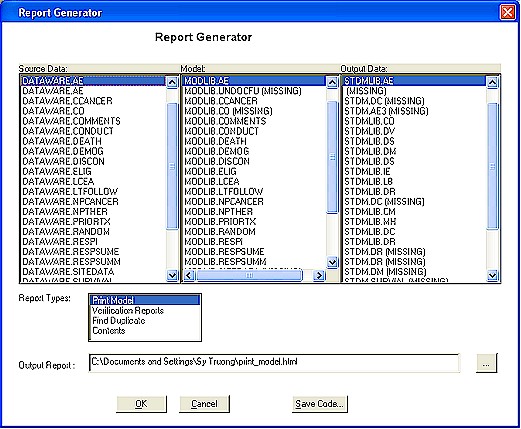
This will allow you to choose
which transformation model on which the report will be generated. The report will contain metadata including:
- Model Name - The model name is
the same as the source dataset name
- Variable - The names of
variables in the source dataset that is being transformed
- Label - The associated variable
label
- Transformation Type - The type
of transformation that is being transformed.
- Update To - The variable
attributes of the new variable that is the target
- User Name - The user name who
requested the transformation
- Date Time - The date and time
which this request was placed
If more than one data model is
selected, an index is generated listing the transformation name with
hyperlinks to each specific detail model report as shown in the sample
below:
The print model is also available through a macro call named
%print_model. The same report can
therefore be generated in a SAS batch program.
Verification Reports
After a transformation is applied, the user needs to verify if the
transformation result is expected. This report will display two
types of reports including:
- PRINT - A print out as generated from PROC PRINT of a subset of the
subject or patient variable for the source and transformed data.
- FREQ - A frequency count of the data between the source and
transformed data.
The report will display the result side by side so that the user can
verify if the transformation is applied correctly. This is available
through the report button from the main transformation manager screen.
The first part of the report that is displayed contains an index of all
the selected source and transformation models. An example of the
report index is shown here:
|
Verification Report Index |
|
Source Data |
Model |
Output Data |
Verification Report |
|
DATAWARE.AE |
MODLIB.AE |
STDMLIB.AE |
PRINT FREQ |
|
DATAWARE.DEATH |
MODLIB.DEATH |
STDMLIB.DS |
PRINT FREQ |
|
DATAWARE.DEMOG |
MODLIB.DEMOG |
STDMLIB.DM |
PRINT FREQ |
The hyperlinks for the PRINT and FREQ will navigate to the detail
report. The detail report will show the source and destination
transformation report side by side. This makes it easy for the user
to apply the verification. In order to navigate back to the index
file, the user can do one of the following:
- Right mouse click and select the menu item "back"
- Click on the key combination Alt + Left Arrow
The verification report is also available through a macro call named
%verification_rep. The same
report can therefore be generated in a SAS batch program.
Find Duplicate
Many source variables may be transformed into one destination variable. This can be an acceptable condition but it is worth review. It is
common to have the destination variables not match or that that the
transformation to the same variable is not intentional. This report
displays all the variables that occur more than once in the destination
transformed datasets. This report is available through the report
button from the main transformation manager screen.
The report will list the following information.
- Source Dataset Name - The name of the source variable containing the
duplicate transformed variable
- Variable - The variable name from the source data
- Update To - The attribute of the transformed variable into the
destination
- Transformed Variable - The new transformed variable name
- Destination Table Name - The destination transformed dataset name
An example report is shown below:
| |
Source Dataset
Name |
Variable |
Update To |
Transformed
Variable |
Destination Table
Name |
|
36 |
TUMORI |
ASMDT |
drdtc
label="Date/Time of Disease Response" length=$10 format=yymmdd10. |
drdtc |
STDMLIB.DR |
|
37 |
RESPSUME |
CRDT |
drdtc
label="Date/Time of Disease Response" length=$10 format=yymmdd10. |
drdtc |
STDMLIB.DR |
|
38 |
RESPSUME |
DTPROG |
drdtc
label="Date/Time of Disease Response" length=$10 format=yymmdd10. |
drdtc |
STDMLIB.DR |
|
39 |
LTFOLLOW |
LCTDT |
drdtc
label="Date/Time of Disease Response" length=$10 format=yymmdd10. |
drdtc |
STDMLIB.DR |
 |
Other reports report only on selected datasets. The find duplicate report however will look through all datasets
defined to Transdata. This will ensure the completeness of the
findings. |
The find duplicate is also available through a macro call named
%finddup. The same report can therefore
be generated in a SAS batch program.
Contents
Once the data has been transformed, a report of the values and
attributes of this data can be available through this report. This
report can be generated to contain either the source data or transformed
data. This is determined by which column is selected from the report
generator screen. This report has two components including:
- CONTENTS - Dataset and variable attributes of the data produced by
PROC CONTENTS
- PRINT - The first 10 observation of the values of the data as
produced by PROC PRINT
This report can be generated by clicking on the Report button from the
main Transformation Manager screen. The report contains an index
that lists all the datasets that has been selected. An example of
this is shown below.
The hyperlinks for the attributes PROC CONTENTS or values report
of PRINT available through the hyperlinks.
|


