Introduction
Capturing the source location of
variables is an important task during documentation. If the variable is a source
variable from a case report form, the Trialex System can store the location of the PDF
version of the annotated CRF for documentation purposes. The location also includes
bookmarks or local links to the specific variable view. The location of this CRF can
be used as a hyperlink in the documentation as shown in this example.
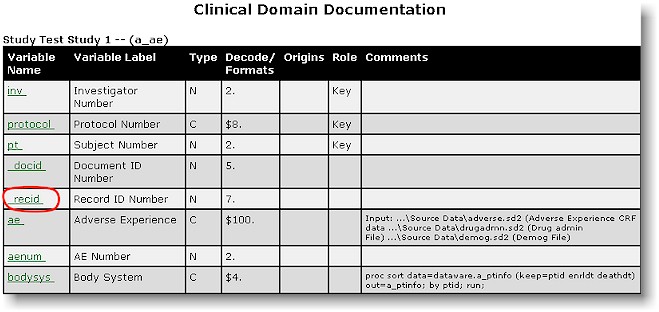
The documentation shown here is
generated from the %datadef utility. If a
variable has been assigned to an annotated CRF location, a hyperlink is automatically
generated.
The assignment of the annotated
CRF location is found within the study conduct area. From the study conduct area,
the annotated CRF selection icon is found one level below the documentation icon.

Documentation
|

Annotated CRF Selection
|
The annotated CRF selection
tool is organized by a set of five sequential dialog boxes which walks the user through
the selection process.
The first step in the CRF
selection is to identify physical location of the case report form on a web server.
The reason that the CRF needs to be on a web server is that during the compilation of the
documentation, all the hyperlinks are created over the web server. If the CRF are
not on the web server, the hyperlinks will not be recognized and the CRF will not be
included.

The path that is required is the
physical path on to the web server which contains the CRF files stored in PDF format.
The second step is to identify the
specific case report form that resides inside the specified location. The dialog box
will list all the PDF files that exist in the specified location.
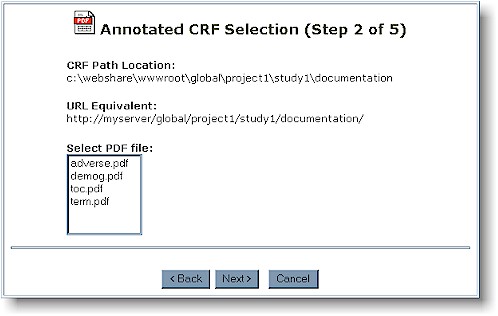
A bookmark is a link to a specific
view within a PDF page. This allows for the link to the specified PDF page along
with the zoom view on a particular variable within that page. The zoomed view has a
corresponding bookmark name. This is captured in the third screen.

The PDF file specified on this
page also acts as a live hyperlink to the specified PDF page.
The last steps are to associated
the CRF location to the specific variable within a data set. The Trialex System
first requests for the data set which contains the variable.

Note that during every step of the
process, the selections are documented at the top. The last dialog box presents all
the variables within the selected data set. The system then associates the variable
with the location of the CRF and the hyperlink is generated during the final
documentation.
|

