|
Overview
Information stored in Transdata can be surfaced through a search
engine which is available the "Search" button from the "Transformation
Data Manager" screen. The search will be applied upon key fields
within Transdata. You can then navigate to the specific item from
the search results.
Search Criteria
The search criteria is open text that can be specified from the
Transdata Search Screen.
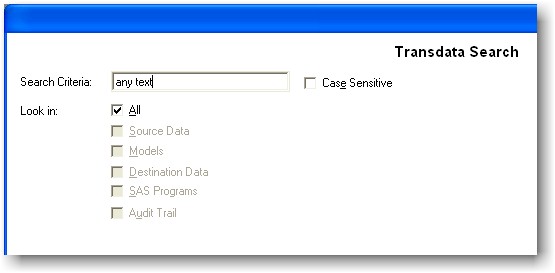
The search criteria can be applied
with or without case sensitivity. By default, all categories will be
applied. The key categories include:
- Source Data - Search through
the dataset name, dataset label, variable name, and variable label.
- Models - Search through the
"transformation type" and "update to" category of the model.
- Destination Data - Search
through the dataset name, dataset label, variable name, and variable
label.
- SAS Programs - Search through
each line of the SAS program.
- Audit Trail - Search through
source data name, output data label, model location, destination table
name, path and name of the saved programs, accessible permission, user
name, and date time.
Search
Results
The search can be initiated by the default return key or by clicking
on the OK button. The result of the search is shown by name.
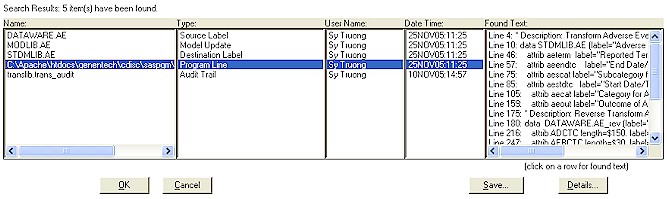
The details of the found text will
only show after the user selects the name column. The found text
will list all the occurrences found for that specified name. You can
then select the specific findings in the Found Text and click on the
details button. This will then navigate to the specific location of
the findings. Depending on what type of data, the details will
display the information according to each type.
|


