|
What is Transformation Code
Transdata is a code generator that generates standard SAS code to
perform its data transformation. This is allows for the following
advantages:
- Users can reproduce the results
in batch mode.
- The program code can be used as
a foundation template for more sophisticated customized transformation.
- Testing and validation of the
transformation can be performed by evaluating the log of the submitted
code.
The SAS code is simple data step
codes that are generated by the system to automate the process of applying
transformations.
Where is Code Generated
SAS code generation can be requested either from the main
"Transformation Data" screen or from the "Transformation
Data Manager" screen. The difference being that the "Transformation
Data" screen contains codes
that transform only one dataset while the "Transformation Data Manager" screen
can generate code for multiple transformation models at once.
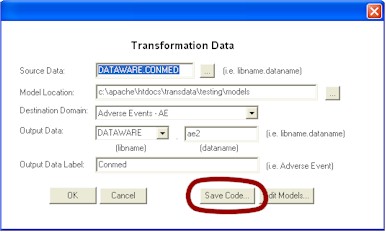
The program can be stored anywhere
on disk that the user has accessed. This program can then be
executed as a stand-alone program outside of the Transdata system.
It can be further modified to perform custom transformation.
Once the "Save Code..." button is selected, the user decides where and what file name to save the
file. The program can later be applied again.
 |
If multiple data models are
selected on the transformation data manager screen, the file name is
defaulted to be "trans_&model". This will produce multiple
transformation programs one for each model. The name of the each
program will have the name of the model replaced for the "&model". For example, if the model is named AE, the program will be
"trans_ae.sas". |
Editing Transformation Code
All the saved programs are listed in the saved program list within the
"Transformation Data Manager" screen. You can select the program one
at a time and view or edit the program by clicking on the Edit Program
button.

It is optional to have your
program viewable by other team members or have it only viewed by your
self. This is accomplished by selecting the share public or private
radio buttons. The programs will still be saved on disk but it will
only hide for private from the list of programs listed in Transdata.
|


