|
Overview
Transformations generated from Transdata may need to be merged to form
the final data. It is common to have custom transformation generate
intermediate data that is merged with transformation applied through Transdata. You can perform join through the graphical user interface
of Transdata or through a macro call. The graphical user interfaces
will also generate the macro call in the even you wish to resubmit the
join in batch mode.
Selecting Join Data
The join facility is available through the "Join" button found in the
main "Transformation Data Manager" screen.
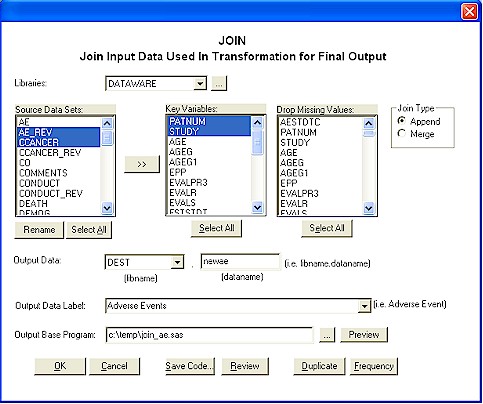
The join screen allows you to select more than one dataset from one
library. It is optional to rename the variable from the source
datasets. This allows you to join data by key fields with different
names since the keys have to be the same. The rename would only be
applied during the join and does
not affect the original source data. After selecting more than one
dataset from the source, you can click on the ">>" button to have the
variables display in the key and drop missing lists.
The drop missing value is an
option where if all the selected variables are missing, it will drop that
observation.
There are two types of join
including "Merge" and "Append". The Append will apply a SAS "SET"
statement where the data is stacked on top of each other. The merge
applies a SAS merge where the data is sorted by key fields before being
merged.
Generate Join Code
There are two types of programs that can be generated from the join
facility. This includes:
- Macro Code - This is the %join
macro call with all the parameters that you selected.
- Base Code - This is the SAS
Base code that contains the PROC SORT and DATA STEP code which actually
performs the join.
You can generate the macro code
through the "Save Code" button. In this case, you are presented with
a name of a program that will contain the proper LIBNAMES and macro calls.
To create base code, specify the
location of the base code location in the "Output Base Program" entry. The OK button will actually generate the program. You can also
choose to preview the code prior to the application of the join through
the preview button.
Join Related Reports
There are two reports that can be generated during join. This
includes:
- Duplicate - This report
searches for variables through out all datasets in the specified libnames and find duplicate variable names. This is a useful report in
determining key fields.
- Frequency - This report shows
the frequency (using PROC FREQ) for all selected key fields.
These reports are available
through the buttons by the same name.
|


