|
Transformation Model Overview
A transformation model is a set of instructions that describe how
each variable within a dataset will be transformed. This includes
instructions such as renaming a variable or changing a variable value or
label. Each source dataset will have an accompanying set of
transformation instructions referred to as the model. This model is
stored in a dataset with the same name as the original source dataset. There is therefore a one to one correspondence between the source datasets
and model datasets. The set of models are grouped in the location
where it is stored. Each source dataset is therefore assigned to a
corresponding model. It is possible to have one dataset have
different models or multiple dataset pointing to the same model but in
general, it is recommended to have a one to one correspondence between
source data and transformation models.
Navigating Models
The transformation model screen is accessed through the edit models
button from the transformation screen.
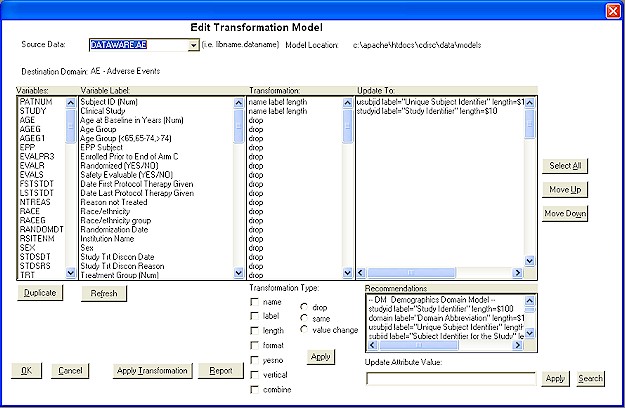
Once you enter the "Edit
Transformation Model" screen, you can navigate between models via the pull
down menu corresponding to the source data. This will show all the
data that has been assigned with a corresponding model. Upon
selection of the pull down menu, the items from the model will be
refreshed to list all the information from the source and transformation
details.
Defining Transformation Type
The transformation type describes what type of transformation is to be
performed. Among the attributes changes that can occur include:
- name - Variable name can be
renamed
- label - Variable label will be
changed.
- length - The length/type can be
changed. SAS uses the $ to signify character fields. Therefore, a
change to $20 means change to character variable type with length of 20.
- format - Variable format will
be updated.
- yes no - If the value of the
variable is "yes", it will produce a new row with the newly assigned
value of the label.
- vertical - Multiple variables
can be assigned to one variable that will produce a row if it has a
value.
- combine - Combine values of
multiple source variables into one destination variable.
Besides attributes, other types of
variable level changes can be applied to a variable. This includes:
- drop - The variable from the
source dataset will be dropped when creating the destination data.
- same - The same variable with
all of the same attributes will be kept in the destination data.
- value change - This can have
a recoding of either values or a formula change. This will change
the actual values of the variable.
 |
Only attribute
changes or variable level changes can be applied at one time.
You can therefore not apply both an attribute change and a variable
level change at the same time. |
Once the selected types of changes
are selected from the check boxes or the radio buttons, the "Apply" button
will apply this to the selected variables. This can be applied to
multiple variables at once. If it is an attribute change, the
default attribute will be populated into the "Updated to" column. If
it is a variable level change, the corresponding "Updated to" column will
be cleared.
Defining Updated Value
The "Update to" column that will be referred to as just update
captures the instructions for the actual transformation. These
instructions are close but not exactly like SAS code. If one
variable is selected, the value of the update field will be displayed in
the "Update Attribute Value" text field. You can edit this and then
apply to have this updated. If there are multiple fields selected,
the value that is in the "Update Attribute Value" fields will be applied
to all selected variables.
Searching and Applying
Recommendations
A list of recommended attributes changes are listed by domain names as
defined by CDISC. You can scroll down the list or apply a search. The selected text form the list will be displayed on the "Update Attribute
Value" fields. Once this is selected, the Apply button will apply
this to the updated fields. The search is a case insensitive
search through
the entire recommendation list. If the
criterion matches
any where within the text of the recommendations, it will be listed. The list of recommendations will be refreshed to its entirety if the
search
criterion is blank and the search button is pressed.
|


