|
Transformation Overview
Defining attributes to a transformation is the first step required
before any data can be transformed. You define a transformation by
identifying the location and name of the source and output data. Each
transformation will also be assigned a transformation model that
describes how each variable within the source data will be modified to
the target destination data. The transformation is stored in a dataset
with the same name as the source data, but in a different location. The
key fields which uniquely identify each transformation includes:
- Source Data
- Model Location
All the attributes are defined
through the Transformation Data screen as described below.
Transformation Attributes
The transformation is identified its attributes. All the attributes
are required defining before the models can be edited or
the transformation can be performed.
- Source Data - A SAS data
set that will be transformed. It is required that the user has
read access to this data.
- Model Location - The
path location to where the data transformation model will be
transformed. This is required to be different from the location of
the source data.
- Destination Domain - A
descriptive label used to identify and group the set of source data.
- Output Data - A SAS
dataset that will be contain the transformed data. The user needs
to have write permission to this file.
- Output Data Label - A
descriptive label to the output data set.
All the attributes of the
transformation will be stored in a centralized database. The unique
identifier between transformations is the combined key fields of source
data and model location.
Transformation Data Screen
The transformation data screen is the first and main screen where you
will be defining your data transformation. It contains all the
attributes to the transformation. This window will appear when you
click on the "New Model" or "Model Info" button from the main
Transformation Data Manager screen.
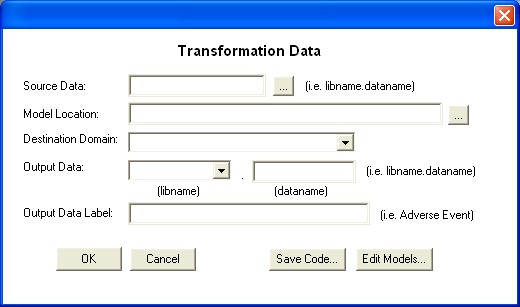
All the fields must define
before you can apply the transformation through the OK button. Before you save the code or edit the transformation model, it is also
required that all fields from the screen be identified. The buttons
perform the following tasks:
- OK - If you are creating
a new transformation model through the "New Model" button, this will
register the model information. If you are reviewing the model
information through the "Model Info" button, this will generate
the transformation code and apply the transformation according to the
specified attributes. The attributes entered will be entered into
a central database and an audit trail is kept.
- Cancel - Nothing is
applied and the screen will close out.
- Save Code - This will
prompt the user for the location of the new program and save the
generated code used to perform the transformation.
- Edit Model - This
will display the edit model screen that allows you to define the
transformation of each variable.
 |
- All fields must be
identified and valid before the OK, Save Code and Edit Model buttons can be applied.
- The model has been edited
before the code can be generated.
|
|


